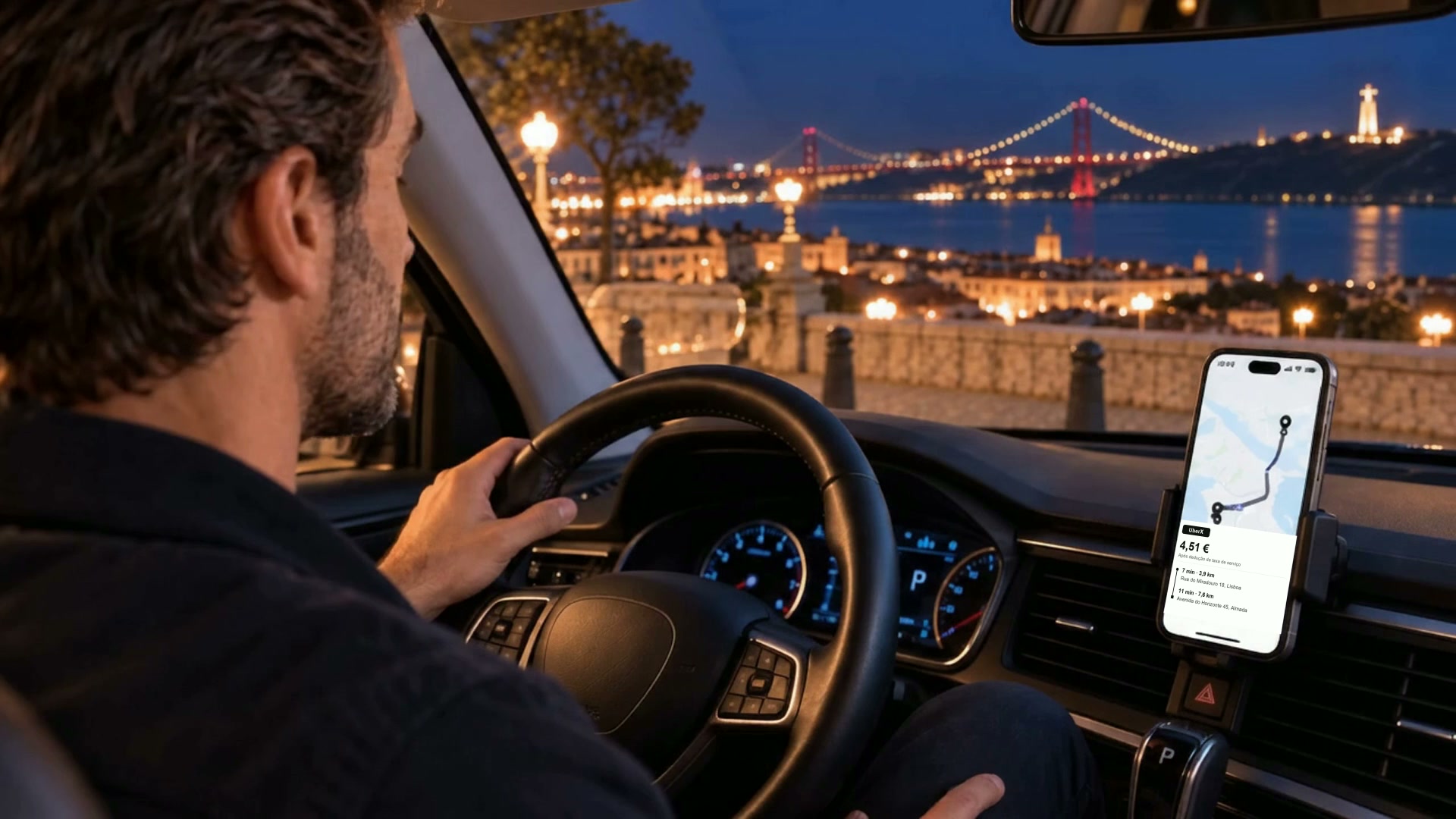
SmartDriver reads the offer on your screen and shows a traffic light with the value per km and per hour. This helps you make a better decision in seconds, without doing maths while driving.
Better decisions, without taking your eyes off the road
The app reads the offer and does the maths for you. The decision is always yours.
Profitability traffic light
See green, yellow or red instantly and decide without doing any calculations.
Real €/km and €/hour
Every offer includes both the pickup distance and the trip distance, because both matter.
No-go zones
Draw the areas you want to avoid on the map and choose whether they count for the pickup, the drop-off or both. You can take customers to the airport without picking anyone up there.
Platforms in Portugal
Tested with Uber, Bolt and POP in Portugal, including offers that appear mid-trip. Turn on POP under “Platforms to capture”. Need a specific platform in your country? Get in touch and we'll make it available.
Floating button
Discreet while you drive; the traffic light only appears when there's an offer to evaluate.
Offer history and map
Every offer that shows up is saved. You see which hours and which areas are worth driving, and the app warns you when the market pays less than usual. See how it works
Shifts and Earnings
The Radar counts your hours, warns you before 6 and before 10, and exports the log for an inspection. At the end of the shift you enter what you earned and see what is left after the car. See how it works
Costs and vehicles
With fuel, rental and commission, the app tells you how much you need to bill per hour to be left with what you wanted to earn. You can save more than one car.
Stays on your phone
Reading happens on the device. Your zones come back automatically after updating or reinstalling.
The traffic light
Green, yellow or red at a glance
The traffic light appears over the app you're using, usually at the top of the screen, and you can drag it wherever you like. Green means it is worth it, yellow means it is fair and red means it is not worth it.
Three styles to choose from, in Settings
WORTH IT
€/Hour22.00
€/Km1.57
RIDE30 min • 7.0 km
"Traffic light" style
€/Hour€/Km
22.001.57
RIDE30 min • 7.0 km
"Classic" style
€/Hour€/Km
22.001.57
RIDE30 min • 7.0 km
"Gradient" style
Green values pulse to grab your attention right away. Dark or white background, your choice. With "Gradient", the whole card takes the colour of the rating, and you can also have it in white or black, with the coloured outline doing the reading.
A sound for every situation
Every offer plays its own sound, so you can recognise good opportunities without looking at the screen:
🟢 All green
You hear this sound when both the hourly and per-kilometre values are good.
🟡 €/hour green
The "OK" sound tells you that the value that matters most to your day is good.
🟠 €/hour weak
The warning sound gets your attention. You decide whether the offer is still worth it.
The back (addresses) and no-go zones
RIDE
€11.00net, taxes included
6 min • 1.0 km
R Cruzeiro 44, Lisbon
24 min • 6.0 km
Docas, Alcântara, Lisbon
Tap once to flip the card and open the addresses in the map
⚠ CENTRE
FAIR
€/Hour19.57
€/Km1.25
RIDE23 min • 6.0 km
Offers inside a no-go zone show warning stripes, the zone name and the icon of the address involved
The floating button
The halo is grey while at rest
The halo turns bright green when ready
Traffic light, sounds and no-go zones work together: you decide at a glance, eyes on the road and no maths.
History
Your own experience, turned into numbers
With the Radar on, every offer that shows up on screen is saved on your phone only. After a few days you can see which hours and which areas are worth driving.
Last 14 days: the height of the bar is the number of offers that day
291357911
One day at a time. Each bar splits into good, medium and poor, in the traffic-light colours. Tap a bar and you see that day in numbers. The blank day is a day off. The app doesn't invent anything for you.
Best hours: green above your good level, red below your minimum
SMTWTFS00–0303–0606–0909–1212–1515–1818–2121–24
Grey is what isn't known yet. Where there are few offers, the square stays grey and without a number: painting a conclusion out of two offers would be inventing it. It fills in on its own as you drive.
And the same on the map. Offers are grouped into 400-metre squares by pickup spot: the colour says how much the offers from there pay, or how many show up. You can show all platforms or filter by Uber, Bolt or POP, by weekday and by time of day. Of the addresses, only coordinates rounded to about 100 metres are kept, never the written address, and nothing leaves the phone.
When the market changes, the app tells you
The market is low
12 offers in the last 90 minutes, 9 below your minimum.
The market is offering €10.40 an hour. Your minimum is €13.00.
Use €10.50 as your minimum until 7:30 PM
As the history fills up, the app starts to know what the market is paying right now. When the offers of the last 90 minutes are far from your thresholds, below or above, this card shows up on its own, where the traffic light goes, and fades like it does. It is then kept in the floating button's menu until you have seen it.
The button puts the proposed value to work for two hours and then ends by itself. Your settings are not touched, and you can restore your minimum whenever you want.
The app never proposes a minimum below what it costs you to work, and it tells you how many offers an hour you would start refusing before you tap the button.
What an hour behind the wheel costs you
One hour behind the wheel costs you
€6.40
To be left with €12.00 an hour, you need to bill
€18.40
Example. Your own numbers come from the car you set up.
In Costs and vehicles you tell the app what it costs you to work: rental or loan, insurance, fuel consumption and fuel price, the commission you pay on top of the offer and the tax set-aside. You can save more than one car and mark the one you are using. With two or more, the app asks once a day which is today's car.
Out of that comes the number that matters: how much you have to bill per hour to be left with what you wanted to earn. Compare it with your traffic-light threshold: if the threshold is lower, you are taking rides that don't pay you what you wanted.
Shifts and Earnings
What is left at the end of the day, and the hours nobody counts for you
The app sees the hours you worked. You know the money that came in. Put the two together and you get the number no platform gives you on its own: what an hour of shift really pays, waiting included, and what is left after the car is paid.
Last 14 days: the bar is what you earned that day
2468101214
after expenses expenses not recorded
The lime part is yours. It sits at the base on purpose, so it can be compared from day to day at a glance. Look at the second-to-last day: tall bar, short slice. Good money in, and the car ate almost all of it. Two separate columns never showed that.
Last recorded shift
7h 20min of shift · 168 km · 128.40 € earned
11.11 € /h
per hour of shift, after expenses
Expenses (car and commission) 46.90 €
After expenses 81.50 €
Each kilometre gave you 0.49 €
Example. Your numbers come from the hours the app counted and the car you set up.
The kilometres are the odometer's and they include the empty ones on the way to the pickup and back home. That is fuel genuinely burned, and an offer's €/km never counts it.
The app does not see money, and does not pretend to. At the end of each shift you tell it what you earned on Bolt, on Uber and elsewhere. It takes ten seconds, and it is kept shift by shift. With no car set up, the app shows what you earned but will not claim what was left: without the costs, it does not know. And it compares you with what offers were paying during that shift, not right now.
Your hours, counted on their own
Turning the Radar on starts the shift; turning it off asks whether it was a break or the end. There is nothing extra to press: the time counts itself while you work.
The app warns you half an hour before 6 hours in a row, at 6 hours, and as you approach 10 hours in any 24. The first warning comes while you can still choose where to stop. Each warning appears once and only returns after a break that counts.
Only stops of 15 minutes or more count. Shorter ones are shown separately, so you know the app noticed them.
Today
Working time
5h 40min
Without a break
5h 40min
20 minutes to go before 6 hours in a row. The app warns you first.
The log you show to an inspector
15/08/2026 · 08:00 → 18:10
Work 9h 10min · Break 30min
Missing 15min · Not recorded 1h 05min
Highest in 24 h 10h 40min
One line per day, in the PDF and in the CSV.
The log exports as PDF, CSV and a QR code, for the period you choose: 7, 28 or 90 days, a year, or everything. The QR shows on the screen itself, at full brightness, to be read right there by another phone.
What the app did not see is written down. With the Radar off, those hours appear as not recorded and never as rest, because they could have been work. A log that owns its gaps is worth more than one that pretends to have none.
The identity is yours and it settles: once you confirm, the name, tax number and driver certificate number can no longer be changed. That is what ties those hours to you. The certificate expiry and the operator can always change: changing operator is normal and does not change who you are.
The log is kept for five years and exporting it deletes nothing. It stays on your phone: your details never go to the account or to any server. A document generated by you; it is not an official document and does not replace what the law requires from the operator or the platform.
The shift log is optional and starts switched off, and it was built for the Portuguese TVDE rules. If you drive in another country, or already track your hours another way, just leave it off: the traffic light, the history and the costs work anywhere.
No traffic stress
Rush hour stops being a risk
Platforms adjust the trip time and fare to current traffic. When the traffic light shows that an offer is worth it, the hourly value already accounts for that traffic. It is not an estimate that traffic will later ruin.
Example: a heavy-traffic afternoon in Lisbon
Many drivers avoid the main roads into the city, tourist areas and the end of the day, when everyone is heading home. They worry about getting stuck without earning enough. In SmartDriver's Settings, you choose the hourly value you consider worthwhile. The traffic light only turns green when the offer meets that value, with traffic already factored into the platform's estimate. This gives you more confidence to accept rides anywhere in the city and at any time.
Something unexpected can still happen after you accept a ride, but that becomes the exception rather than the rule.
Everyone wins
Deciding well doesn't just help the driver
A good decision from the start is better for everyone.
Fewer cancellations
When you make a good decision upfront, you avoid accepting only to cancel later. The trip runs smoothly, which is better for platforms and passengers.
Offers reaching the right driver
A ride that does not suit you becomes available sooner to another driver whose location, price and distance make it worthwhile.
You win
You choose the rides that are worth it, with less stress and better earnings at the end of the day.
Beyond Portugal
Born in Portugal. Built to grow.
SmartDriver was created, optimised and tested in Portugal on Uber, Bolt and POP. Its offer-reading system may also work in other countries and with other apps, so it is already taking its first steps in new markets as a beta.
United Kingdom
Uber · Bolt beta
United States
Uber beta
Brazil
Uber · 99 beta
In these markets, the app is experimental and may need some tuning. Do you drive in one of these countries, or use a different app elsewhere? Try it and tell us how it went. We will work with you to fine-tune and improve it.
You can install the app before choosing. An account is only required when you turn on Radar and choose the trial or a plan, so access is linked correctly.
It has been tested with Uber, Bolt and POP in Portugal. If you need a specific platform in your country, email us at geral@smartdriver.pt and we'll make it available.
How do I get access after paying?▾
Subscribe inside SmartDriver. After paying by MB WAY or Multibanco, confirmation is received automatically and the plan days are added to the account currently signed in.
Does it auto-renew?▾
No. Each plan is a one-time payment that gives access for 30, 90 or 365 days. When it ends, you decide if you want to continue.
Does the app read what's on my screen?▾
Offers are read on your own phone to display the traffic light. We don't send your screen content to any servers.
Is the reading 100% accurate?▾
Accuracy is very high, but it may not be perfect. Always confirm the values in the platform's app before accepting.
Ready to decide with the traffic light on your side?
Activate today and choose, in seconds, the rides that make sense for you.